
One of your client projects is losing money this week.
You do not know which one. Harvest has the hours, GitHub has the work, and nobody puts the two together until the budget is gone. SRP does, every day, for every client, and names the one to fix first.
30-day free trial
No credit card required
Free plan when the trial ends, nothing locked
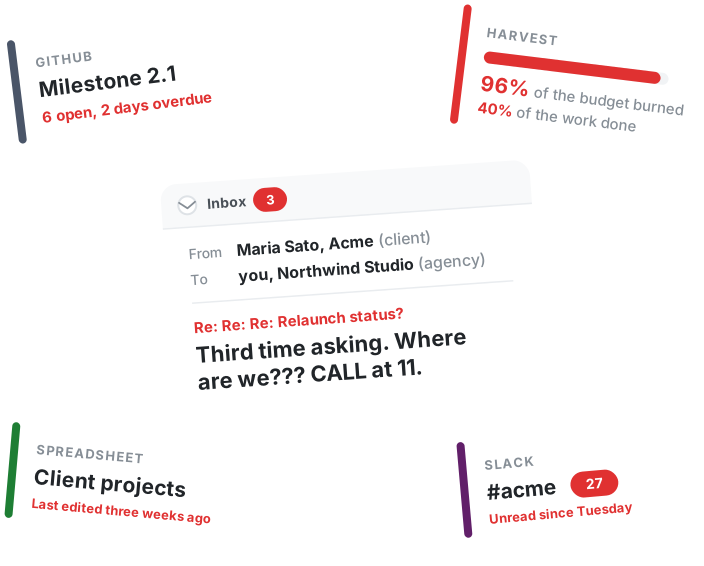
See the loss while you can still stop it.
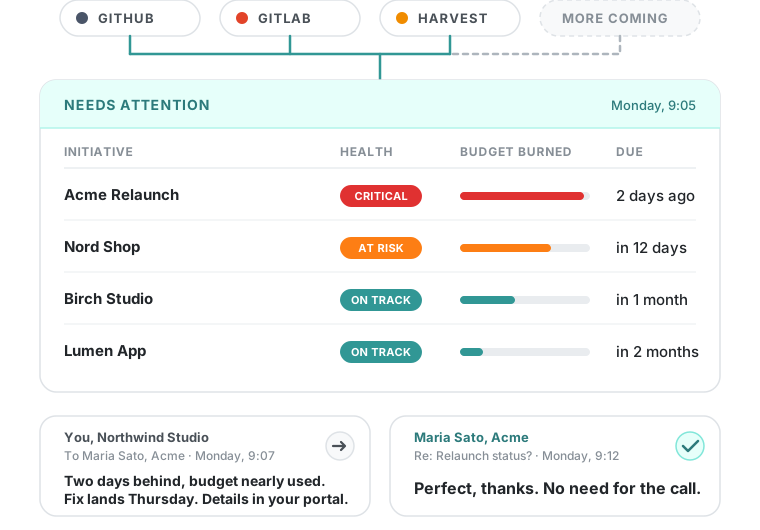
SRP reads the work and the hours you already record and draws the conclusion for you. When the budget is almost gone and the work is not, that is money you lose. SRP shows it early, while you can still talk to the client.
We use SRP to build SRP. Every feature on this page, we rely on daily.
Where the money goes.
Hours you cannot bill. Budgets that run out early. Status emails nobody pays for.
Late work is unpaid work
SRP reads due dates, blockers and the decisions that have gone quiet across every client project. Nobody sets a status. Overdue, blocked and stalled surface on their own, while there is still time to fix them.
The budget runs out before the work is done
Put a budget in hours on each client project. SRP syncs hours from Harvest and compares them with the work actually finished. "191 of 200 hours, 40 percent done" turns at risk on the same screen as late and blocked.
Status emails nobody can bill
Each client gets a passcode-protected portal fed by the same work: progress, milestones, files. Maria looks instead of asking. You stop writing "here is where your project is" emails.
At €60 an hour, a project that runs 40 hours over has cost you €2,400 before anyone notices.
Keep your tools. SRP watches them.
1. Connect
Connect the place your developers work and the place your hours live. Or type the budget and the deadline in yourself. Ten minutes either way, and nobody on the team changes how they work.
2. Watch
Every day SRP compares the hours burned with the work finished, for every client. Nobody sets a status.
3. Act
Open the dashboard on Monday, worst client first. Three tasks blocked, budget 80 percent gone. Fix it before the call.
SRP replaces nothing. What each tool does, and what SRP adds on top.
| What it does | What SRP adds | |
|---|---|---|
| Asana, Monday or ClickUp | Run tasks. Someone sets the status by hand. | Keep them for the day to day. SRP holds the client, the deadline and the budget above them. |
| GitHub or GitLab | Hold the developers' work. No client, deadline or budget on it. | SRP reads them. Milestones and issues come in on their own and move on their own. |
| Jira or Linear | Hold the developers' work. SRP does not read them yet. | Keep them. Link the issue to the SRP item by its URL, and put the client, the deadline and the budget in SRP. |
| Productive, Scoro or Teamwork | They become your only tool, priced per person. | Your tools stay. One flat price. |
| Harvest | Shows the budget per project, after you open it. | SRP reads it. Burned 80 percent and finished 40, every client, on one screen. |
Asana, Monday or ClickUp
What it does
Run tasks. Someone sets the status by hand.
What SRP adds
Keep them for the day to day. SRP holds the client, the deadline and the budget above them.
GitHub or GitLab
What it does
Hold the developers' work. No client, deadline or budget on it.
What SRP adds
SRP reads them. Milestones and issues come in on their own and move on their own.
Jira or Linear
What it does
Hold the developers' work. SRP does not read them yet.
What SRP adds
Keep them. Link the issue to the SRP item by its URL, and put the client, the deadline and the budget in SRP.
Productive, Scoro or Teamwork
What it does
They become your only tool, priced per person.
What SRP adds
Your tools stay. One flat price.
Harvest
What it does
Shows the budget per project, after you open it.
What SRP adds
SRP reads it. Burned 80 percent and finished 40, every client, on one screen.
No other tools? No problem.
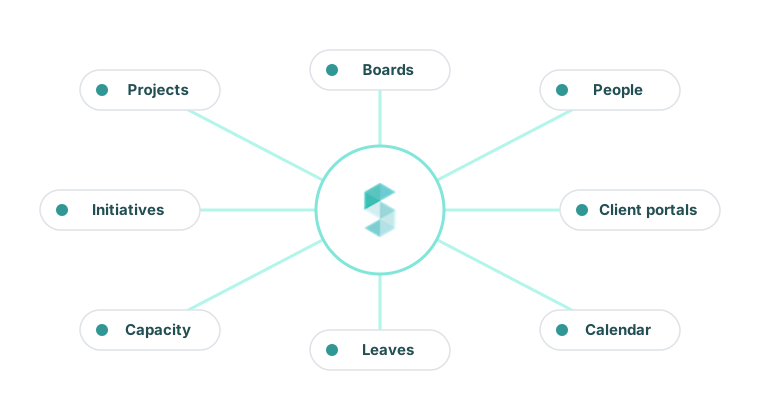
SRP is a full project tool on its own. Projects, boards, people, capacity, leave, client portals. A client with no GitHub and no Harvest gets the same watching as one with both. Type the budget and the deadline in, and the rest works the same way.
Ask it from your agent.
SRP is an MCP server on every plan. The answer the dashboard shows, your agents can ask for too.
Plug Claude, ChatGPT Desktop, Cursor, Copilot, or any MCP client into SRP with a personal token. The agent acts as you: same role, same permissions, same answers.
Ask which client is slipping, file the work, check capacity and who's on leave. You don't open another board. You don't paste a status update. The answer the dashboard already computes is simply there when an agent asks.
Ask which client is slipping
"Which client is slipping this week?" returns the same answer the dashboard shows.
Act on the work
Create and update initiatives, work items, tasks, leave requests, and calendar events.
Same permissions as you
A personal token is you. Revoke it and the agent is out.
You
Which client is slipping this week?
SRP
Acme Relaunch: at risk. Two tasks blocked, 191 of 200 hours burned, 40 percent done.
The same answer. Now your agents can hear it.
Claude Code
Claude Desktop
ChatGPT Desktop
Cursor
Copilot
Windsurf
Any MCP client
Built for agencies that run many client projects at once.
Owners and managing directors
Of software and digital agencies, 10 to 60 people, 5 to 30 client projects running. Who want to know where every client stands without a meeting, and want to hear about a budget problem while it can still be fixed.
Heads of delivery and operations
Who know where every client stands because they keep it in their head and rebuild it every Monday evening. Who want that picture to exist whether or not they built it this week.
Still have questions?
Stop losing money on client projects.
30-day free trial. No credit card required.